Computer System Validation (CSV) is often referred to as software validation. Regulated companies perform validation projects to prove that their software or system is performing the way it is supposed to work, and not performing in ways that it isn’t intended to work.
There are several examples as to why software validation is important. Look at the FDA’s library of Warning Letters to see more than 200 reasons to validate your software or systems. Our Computer System Validation Boot Camp students read a case study about Therac-25, a radiation therapy machine from the 1980s. Due to programming issues, the machine could administer the wrong amount of radiation to patients (often as a huge overdose), which led to serious injuries and even death. Had there been software validation standards in place, these types of instances could have been identified and remediated prior to the treatment of patients.
Computer system validation is serious and the FDA and other regulatory agencies do not take this lightly.
The FDA defines software validation as:
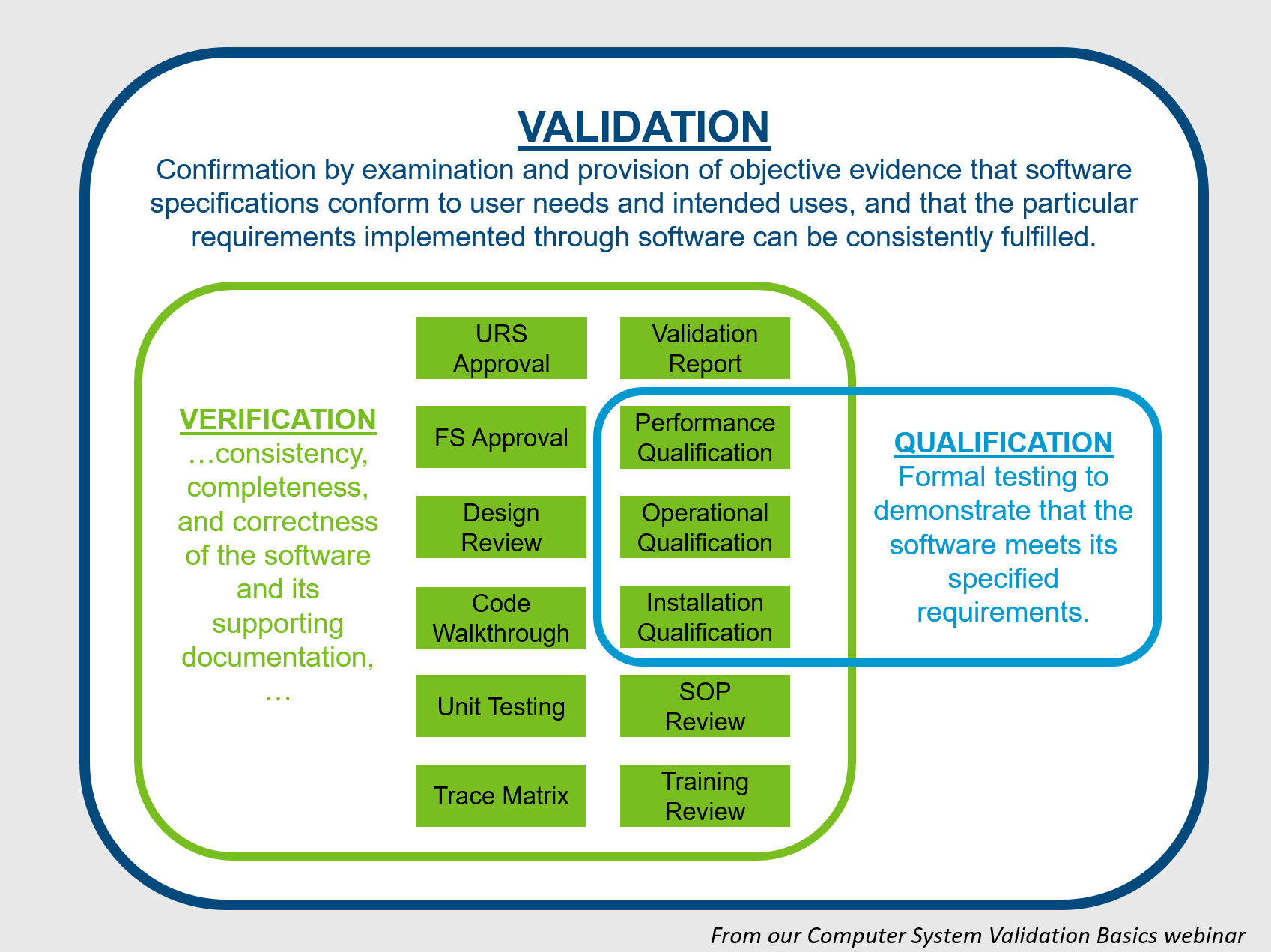
“Confirmation by examination and provision of objective evidence that software specifications conform to user needs and intended uses, and that the particular requirements implemented through software can be consistently fulfilled” – General Principles of Software Validation: Final Guidance for Industry and FDA Staff
To understand the key points, let’s breakdown the definition.
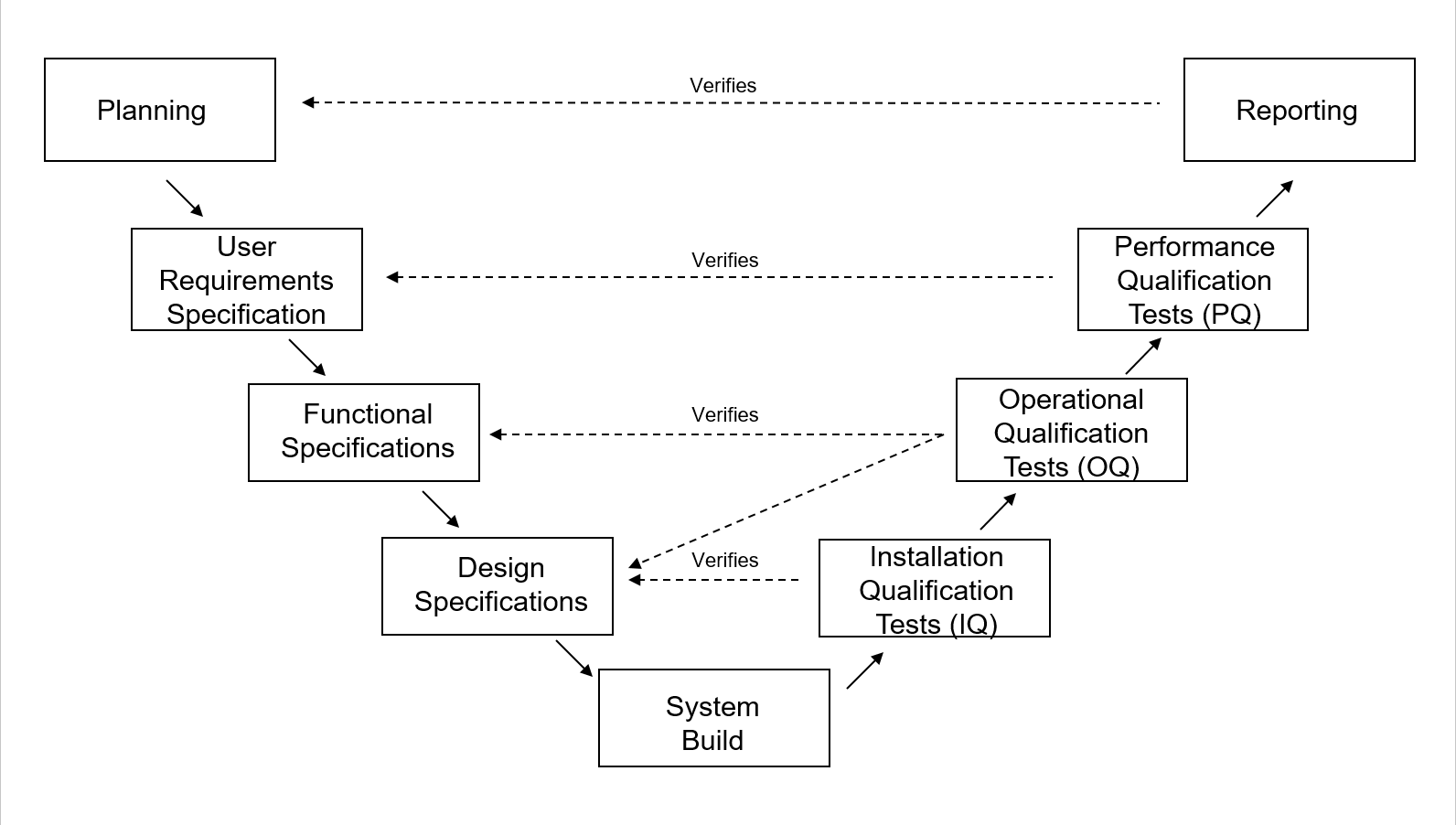
Now that you understand the definition of computer system validation, we can discuss one type of methodology used for validation projects. The classic “V Diagram” was popularized by industry organizations such as ISPE via GAMP Guides.
Here is a picture of the model:
Validation activities follow the diagram beginning at the top left (Planning), proceeding down the V-shape to System Build and then back to the top right, ending at Reporting.
Let’s break down each part a little bit further, starting with Planning.
The Validation Plan defines what will be validated and the approach you will use. It also defines roles and responsibilities along with the most important part, the Acceptance Criteria.
The User Requirements Specification describes what the user needs from the software and how they will use it. It also contains any critical constraints such as regulations, safety requirements, operational requirements, etc.
For example, here’s a list of a few User Requirements that might be needed for a lab system.
The Functional Specification document describes how the software needs to work and look to meet the user needs. The document might include descriptions of how specific screens and reports should look or describe data that needs to be captured.
The Functional Requirements can also include logic and calculations along with how it will comply with regulatory requirements. For example, the Part 11 compliance requirements might detail how passwords or the audit trail should work.
The Design Specification document is one that contains all of the technical elements of the software or systems. This includes:
In the System Build step, you develop or purchase your software and then configure it to the previous specification documents. This step includes unit testing and integration testing.
The Installation Qualification tests provide confirmation that the software or system is installed and setup according to the Design Specification. Usually the software is first installed in a test or validation environment, but there can be exceptions in situations such as manufacturing.
Operational Qualification testing is often referred to as Functional Testing or System Testing. OQ tests confirm that all functionality defined in the Functional Specification is present and working correctly, and that there are no bugs. OQ tests can also include confirmation of any design elements not tested during IQ, such as configuration, are working as specified.
Performance Qualification testing is often called User Acceptance testing. PQ testing confirms that the software will meet the users’ needs and is suitable for their intended use, as defined in the User Requirements Specification. Testing can follow Use Cases, SOPs, user-defined scenarios, etc. For simple software like reports or spreadsheets, OQ and PQ testing are often combined.
The last step in this validation method is to write the Validation Report, often called the Validation Summary or System Certification. This report provides confirmation that all activities specified in the validation plan have been completed. The Validation Report summarizes the testing results and provides confirmation that all acceptance criteria have been met and the software is ready for deployment.
The FDA states that:
Software verification looks for consistency, completeness, and correctness of the software and its supporting documentation, as it is being developed, and provides support for a subsequent conclusion that software is validated.
Verification confirms and reviews tasks within the validation process. It includes review and approval of specifications (URS, FS, Designs), formal design reviews, code walkthroughs, testing (IQ, OQ, PQ), trace matrices (confirming all URS addressed in FS and Design, confirming all specifications tested), validation report (confirming all validation activities complete, acceptance criteria met). Verification could also include confirmation of training materials, user and tech SOPs, DRPs, etc.
Qualification is defined by IEEE as:
Formal testing to demonstrate that the software meets its specified requirements.
Qualification is the formal testing of requirements in either the URS, FS or Design document. You perform these tests during the IQ, OQ and PQ stages of the validation process.
So, Computer System Validation is the overall requirement and process. It is comprised of many, many verification activities, of which the formal testing (IQ, OQ, PQ) vs. specifications is called “Qualification” in many companies.
I hope this post has shed some light on how to do computer system validation so that you can apply this
Attend our free 60-minute Computer System Validation Basics webinar or register for our Introductory training course.
Get help from experts. Our experienced consultants can validate your software or systems for you.